


QUEDEJAPON
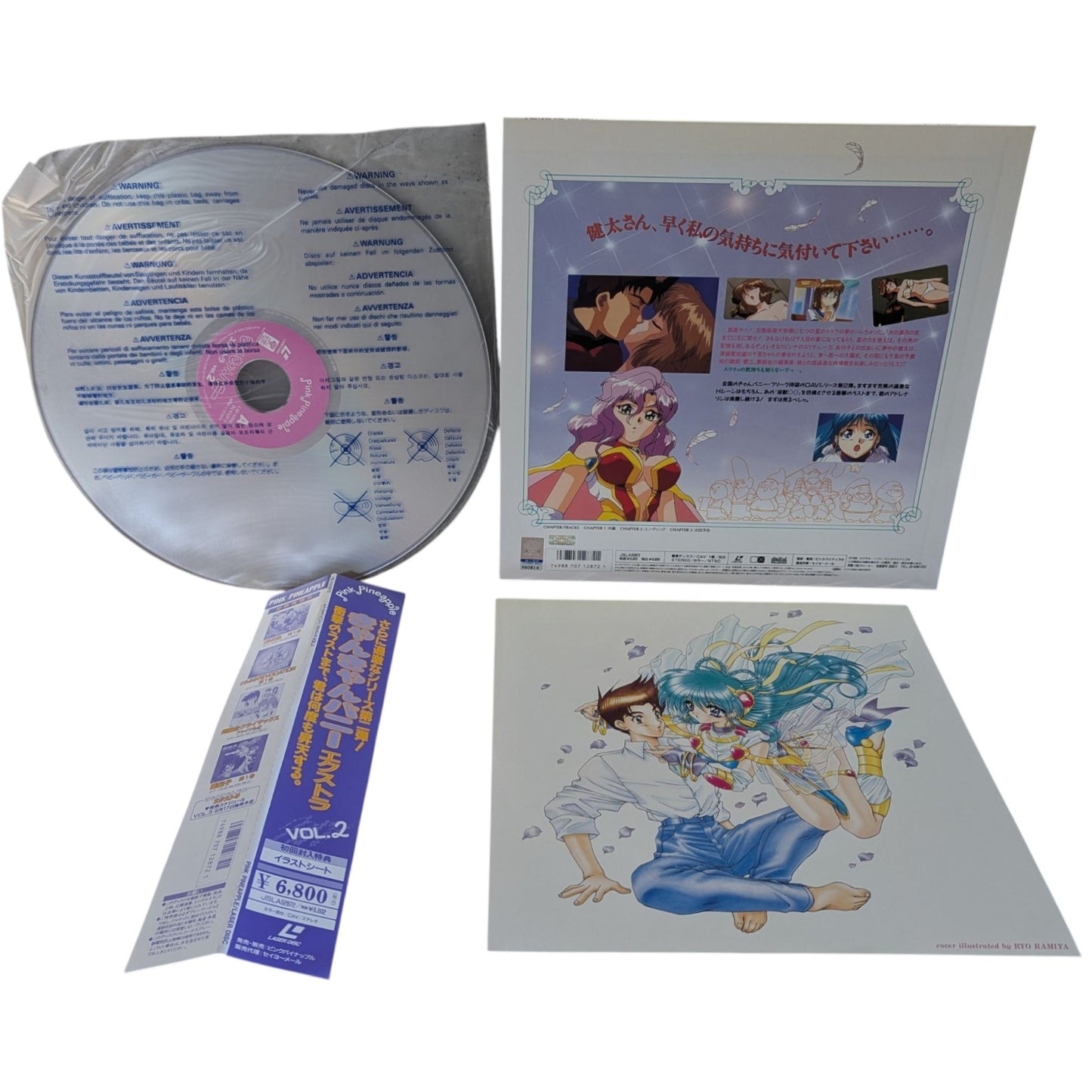
LD- Can Can Bunny Extra Vol 2 (Laser Disc Japan Edition)
LD- Can Can Bunny Extra Vol 2 (Laser Disc Japan Edition)
无法加载取货服务可用情况
LD- Can Can Bunny Extra Vol 2 (Laser Disc Japan Edition)
LD- Can Can Bunny Extra Vol 2 is a beloved anime series that follows the adventures of a group of mischievous rabbits. Directed by Tetsuro Shima, the series is known for its unique characters, humor, and heartwarming storyline. Iconic episodes include the iconic 'Can Can Bunny' theme song and memorable moments with the main characters.
This LaserDisc release of LD- Can Can Bunny Extra Vol 2 features the original Japanese audio with Japanese on-screen subtitles (日本語字幕). The high-fidelity Japanese mastering is presented in a 12-inch jacket, ensuring a faithful reproduction of the original anime experience.
✨ Condition & Included Items
- ✅ Original Picture Jacket: Preserved vintage condition with authentic Japanese cover artwork.
- ✅ Optical LaserDisc(s): Clean playback surfaces inspected with original center labels.
- ✅ Original Polyethylene Inner Sleeve(s): Protective disc sleeve(s) included.
- ✅ Brand New Protective Outer Sleeve: Housed in a brand new, crystal-clear resealable protective plastic outer sleeve.
📋 Technical Specifications
| Title | LD- Can Can Bunny Extra Vol 2 (Laser Disc Japan Edition) |
| Format | LaserDisc (12-inch, 30 cm) - NTSC (Japan) |
| Audio | Japanese (Original Dialogue / LPCM Stereo) |
| Subtitles | Japanese (日本語字幕 - On-screen Japanese subtitles) |
| Video Standard | NTSC (Japan) - Color |
| Catalog SKU | LD-10569630023944 |
| Country of Origin | Japan (JP) |
📦 Packaging & Shipping (Dispatched from Europe - No Customs Fees!)
🇪🇺 Dispatched directly from Europe (Spain): No customs fees, import taxes, or unexpected DUA import clearance delays for European Union buyers!
🛡️ Specialized Protective Packaging: All our LaserDiscs are packaged with professional collector-grade care using heavy-duty, reinforced corrugated cardboard mailers designed specifically for 12-inch vinyl records and LaserDiscs.
Share

- 选择某一选项会使整个页面刷新。
- 在新窗口中打开。
You have copied the placement for the Product Page.
Go back to the App Embeds section, and in the Paypal Advanced Settings, paste the copied value into the Product Page field and click the 'Save' button in the top right corner.